Lesson Overview
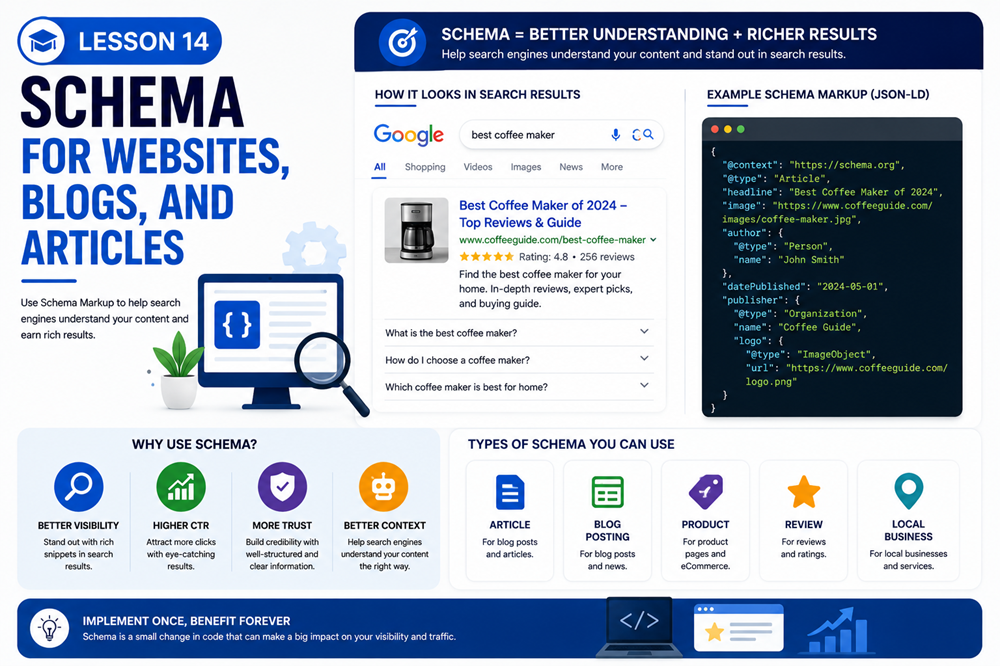
Schema markup, also called structured data, is code added to a web page to help search engines better understand the content.
Schema does not replace good content. Instead, it gives search engines additional context about the page, such as whether the content is an article, blog post, organization, local business, product, FAQ, or other type of information.
What You Will Learn
In this advanced lesson, you will learn what schema is, why structured data matters, where it is used, and how Article and BlogPosting schema can support blogs and articles.
What Is Schema Markup?
Schema markup is a structured way of describing information on a web page. It helps search engines understand what the page is about and what specific details are included.
For example, schema can help identify:
- A business name
- A website or organization
- A blog post
- An article headline
- An author
- A publish date
- A product
- A review
- An FAQ section
What Is Structured Data?
Structured data is information formatted in a consistent way so search engines can process it more easily. Schema is one vocabulary used for structured data.
Many websites use structured data in a format called JSON-LD. JSON-LD is commonly placed in the page code and does not need to visibly appear in the page content.
Why Schema Matters for SEO
Schema can help search engines understand page content more clearly. In some cases, structured data can also make a page eligible for enhanced search features or rich results.
Schema can help with:
- Content understanding
- Article details
- Business details
- Product details
- FAQ information
- Review information
- Event details
Important Reminder
Schema does not guarantee better rankings or rich results. It helps search engines understand content, but the page still needs to be high quality, accurate, useful, and eligible for the search feature.
Common Schema Types
Different pages may use different schema types depending on the content.
Common schema types include:
- Organization: Used for business or organization details.
- LocalBusiness: Used for local business information.
- WebSite: Used for website-level information.
- Article: Used for article content.
- BlogPosting: Used for blog post content.
- FAQPage: Used for frequently asked questions.
- Product: Used for product information.
- BreadcrumbList: Used for page navigation hierarchy.
Schema for Websites
Website-level schema can help identify your website and organization. This may include your business name, website URL, logo, and social profile links when appropriate.
For a business website, useful schema may include:
- Organization schema
- LocalBusiness schema
- WebSite schema
- BreadcrumbList schema
Schema for Local Businesses
LocalBusiness schema can provide structured details about a business. This can include the business name, address, phone number, opening hours, website, and service information.
LocalBusiness schema should match the real business information shown on the page. Do not mark up information that is fake, misleading, or not visible where required by guidelines.
Schema for Blogs and Articles
Article schema helps search engines understand content such as articles, blog posts, and news-style pages.
Article or BlogPosting schema may include:
- Headline
- Author
- Date published
- Date modified
- Featured image
- Publisher
- Main page URL
Example
A blog post titled Beginner SEO Tips for Small Businesses could use BlogPosting or Article schema to identify the headline, author, date published, featured image, and publisher.
JSON-LD Example for an Article
Below is a simplified example of Article structured data. This is only a sample and should be customized for the actual page.
{
  "@context": "https://schema.org",
  "@type": "Article",
  "headline": "Beginner SEO Tips for Small Businesses",
  "author": {
    "@type": "Person",
    "name": "Christina Grant"
  },
  "datePublished": "2026-05-11",
  "dateModified": "2026-05-11",
  "publisher": {
    "@type": "Organization",
    "name": "Computer Technologies LLC"
  }
}
Where Schema Goes
Schema is usually added to the page code. Many websites add JSON-LD inside a script tag in the head or body of the page.
Example format:
<script type="application/ld+json">
{
  "@context": "https://schema.org",
  "@type": "Article",
  "headline": "Beginner SEO Tips for Small Businesses"
}
</script>
In WordPress, schema can be added with custom theme/plugin code, SEO tools, or custom fields. Other website platforms have schema elements you can add to blogs and articles automatically. If your learning platform is being built with custom code, schema can also be added through your theme templates or a custom plugin later.
This Google Structured Data Markup Helper can help build your schema for your website.
Testing Structured Data
After adding schema, you should test it. Google provides a Rich Results Test that can show whether a page is eligible for supported rich result types.
Testing helps you find errors such as:
- Missing required fields
- Invalid JSON syntax
- Incorrect schema type
- Wrong date format
- Missing image information
Common Schema Mistakes
Avoid these common schema mistakes:
- Adding schema that does not match the page content
- Using fake reviews or misleading information
- Using the wrong schema type
- Leaving out important required fields
- Breaking the JSON format with missing commas or quotes
- Assuming schema guarantees rankings
- Adding schema once and never checking it again
Best Practices for Schema
Good schema should be accurate, relevant, and consistent with the visible page content.
Use these best practices:
- Choose the schema type that matches the page
- Use accurate business and article information
- Keep schema consistent with visible content
- Use JSON-LD when possible
- Test your structured data after adding it
- Update schema when page details change
- Do not use schema to mislead search engines
Key Takeaway
Schema markup helps search engines better understand websites, blogs, and articles. It can support content understanding and rich result eligibility, but it must be accurate, relevant, and matched to the real content on the page.
Lesson Quiz
Complete this quiz to test your understanding of schema for websites, blogs, and articles.