
Lesson Overview
SEO can help a website become easier to find and easier to understand, but some mistakes can make SEO less effective. Many beginner SEO mistakes happen when people focus too much on search engines and forget about the user experience.
In this lesson, you will learn common SEO mistakes to avoid and how to make better choices when optimizing a website.
What You Will Learn
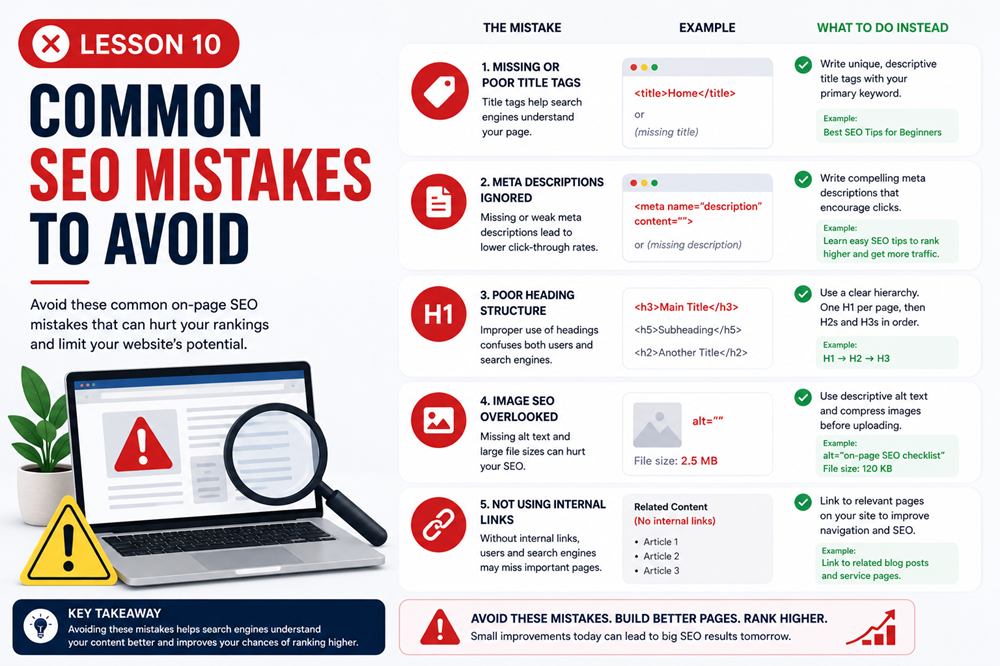
In this lesson, you will learn about common SEO mistakes such as keyword stuffing, weak page titles, missing meta descriptions, poor headings, broken links, missing image alt text, thin content, and ignoring analytics.
Mistake 1: Keyword Stuffing
Keyword stuffing means repeating the same keyword too many times in an unnatural way. This makes content harder to read and can make the page feel spammy.
Weak Example
Our computer repair service is the best computer repair service for computer repair customers who need computer repair today.
Better Example
We provide computer repair services for desktops, laptops, virus removal, upgrades, and small business support.
Use keywords naturally. Your content should sound helpful and readable, not forced.
Mistake 2: Using Vague Page Titles
A page title should clearly describe what the page is about. Vague titles like “Home,” “Services,” or “Page 1” do not give users or search engines enough information.
A better title is specific and relevant to the page topic.
Example
Weak title: Services
Better title: Website Maintenance Services for Small Businesses
Mistake 3: Missing or Weak Meta Descriptions
A meta description gives users a short summary of the page. If the description is missing, unclear, or unrelated, users may be less likely to click the result.
A good meta description should summarize the page and give visitors a reason to continue.
Example
Weak meta description: We offer services. Contact us.
Better meta description: Keep your small business website secure, updated, and running smoothly with professional website maintenance services.
Mistake 4: Poor Heading Structure
Headings help organize content. A page with unclear headings, missing headings, or too many unrelated headings can be hard to understand.
Use one clear H1 for the main topic. Use H2 headings for major sections and H3 headings for subsections.
Good headings help:
- Organize the page
- Make content easier to scan
- Help users find important information
- Help search engines understand page structure
Mistake 5: Thin or Unhelpful Content
Thin content is content that does not provide enough value. A page with only a few vague sentences may not fully answer the visitor’s question.
Helpful content should explain the topic clearly, answer common questions, and give users useful information.
Better Approach
Before publishing a page, ask: Does this page help the visitor understand the topic or take the next step?
Mistake 6: Ignoring Search Intent
Search intent is the reason behind a person’s search. If your page does not match what the user is looking for, it may not perform well.
For example, someone searching for what is SEO probably wants an explanation. Someone searching for SEO services near me may be looking for a business to contact.
Your content should match the reason behind the search.
Mistake 7: Missing Image Alt Text
Alt text helps describe images for accessibility and gives search engines more context. Leaving alt text blank for meaningful images is a common mistake.
Good alt text should be clear and describe the image naturally.
Example
Weak alt text: image
Better alt text: Technician repairing a laptop computer
Mistake 8: Uploading Images That Are Too Large
Large images can slow down a page. Slow pages can frustrate visitors and create a poor user experience.
Before uploading images, make sure they are sized appropriately for the page and compressed when possible.
Good image practices include:
- Use relevant images
- Rename files before uploading
- Add helpful alt text
- Resize oversized images
- Compress images when possible
Mistake 9: Broken Links
A broken link leads to a page that no longer exists or cannot be found. Broken links create a poor experience and make a website feel neglected.
Broken links can happen when:
- A page is deleted
- A URL is changed
- A link is typed incorrectly
- An external page is removed
Check links regularly and update or remove broken links.
Mistake 10: Weak Internal Linking
Internal links help users and search engines move through your website. If important pages are hard to find, users may leave before taking action.
Use internal links to connect related pages, lessons, articles, services, and contact pages.
Example
A page about website maintenance could link to related pages about website security, WordPress updates, and contact us.
Mistake 11: Duplicate or Repeated Content
Duplicate content happens when the same or very similar content appears on multiple pages. This can make it harder for search engines to understand which page is most important.
Instead of copying the same content across many pages, make each page specific and useful.
Mistake 12: Ignoring Mobile Users
Many visitors use phones and tablets to browse websites. If your site is hard to read or navigate on mobile devices, visitors may leave quickly.
Make sure your website:
- Looks good on mobile screens
- Has readable text
- Uses buttons that are easy to tap
- Loads quickly
- Has simple navigation
Mistake 13: Not Updating Old Content
SEO is not only about creating new pages. Existing pages may need updates over time.
Update content when:
- Information becomes outdated
- Services change
- Links stop working
- New examples would help
- The page is getting impressions but few clicks
Mistake 14: Ignoring Analytics
Analytics can show what is working and what needs improvement. If you never review performance data, you may miss important opportunities. This course further discusses analytics in the final chapter Lesson 15.
Tools like Google Search Console and Google Analytics can help you understand:
- Which pages get search traffic
- Which search terms show your website
- Which pages get clicks
- Which pages may need better titles or descriptions
- How users interact with your website
Simple SEO Mistake Checklist
Before publishing or updating a page, check for these issues:
- Is the page topic clear?
- Is the keyword used naturally?
- Is the page title specific?
- Does the meta description summarize the page?
- Are headings organized clearly?
- Is the content helpful?
- Do images have useful alt text?
- Are images sized properly?
- Do internal links help the visitor?
- Are there any broken links?
- Is the page easy to use on mobile?
- Is there a clear next step?
Key Takeaway
Good SEO is not about shortcuts or tricks. Avoid common mistakes by writing helpful content, using keywords naturally, creating clear titles and headings, optimizing images, fixing broken links, improving mobile usability, and reviewing analytics over time.
Lesson Quiz
Complete this short quiz to test your understanding of common SEO mistakes to avoid.