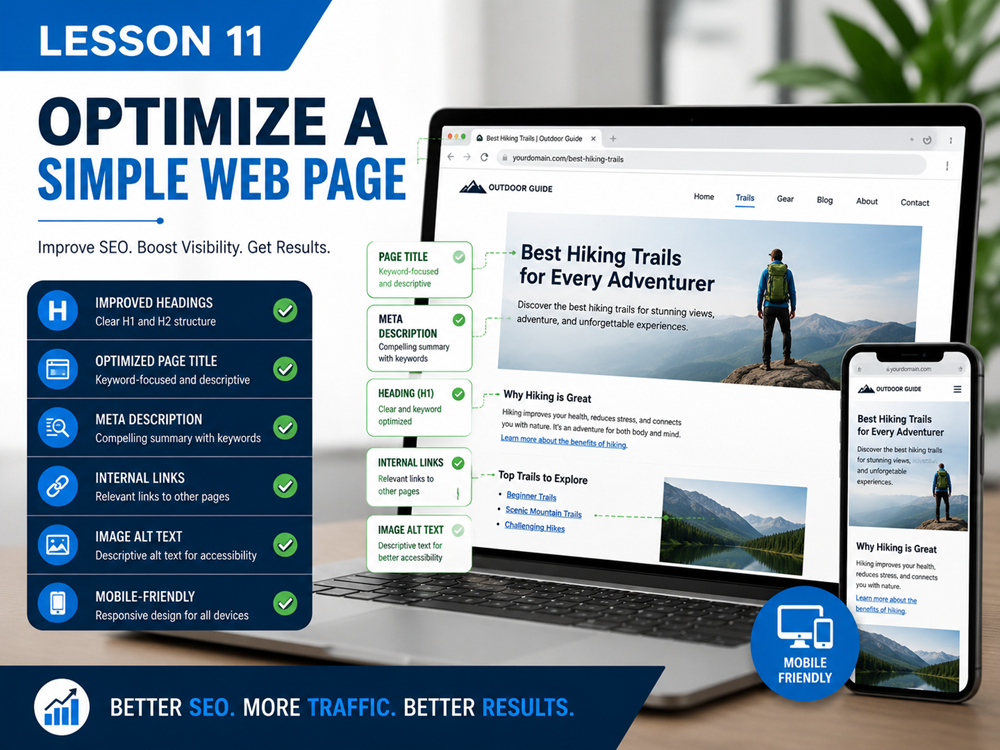
Lesson Overview
In this SEO project, you will apply what you learned throughout the SEO Basics course. You will review a simple web page and improve it using beginner-friendly on-page SEO techniques.
This project will help you practice choosing a keyword, improving a page title, writing a meta description, organizing headings, improving content, adding internal links, and checking image SEO.
What You Will Do
You will take a simple web page and optimize it step by step using the SEO skills from this course.
Quiz Goal
The goal of this quiz is to improve a simple web page so it is clearer, easier to read, and easier for search engines to understand.
By the end of this project, you should have an optimized page with:
- A clear page topic
- A main keyword
- A strong page title
- A helpful meta description
- A clear H1 heading
- Organized H2 and H3 headings
- Helpful content
- Relevant image alt text
- Useful internal links
- A clear call to action
Step 1: Choose a Simple Web Page
Choose one page to optimize. This can be a service page, blog post, course page, lesson page, or practice page.
For beginners, it is best to choose a page with one clear topic.
Example Page Topics
- Computer Repair Services
- Website Maintenance Services
- SEO Services for Small Businesses
- Beginner WordPress Training
- Laptop Repair Services
Step 2: Identify the Main Topic
Before improving the page, write down the main topic. The page should not try to cover too many unrelated subjects.
Ask yourself:
- What is this page mainly about?
- Who is this page for?
- What problem does this page help solve?
- What should the visitor understand after reading it?
Step 3: Choose a Main Keyword
Choose one main keyword or key phrase for the page. The keyword should match the page topic and what your audience may search for.
Example
If the page is about computer repair services, possible keywords could include:
- computer repair services
- computer repair for small businesses
- laptop and desktop repair services
- computer repair near me
Choose the keyword that best matches the page and the visitor’s intent.
Step 4: Improve the Page Title
The page title should clearly describe the page. It should include the main keyword naturally when possible.
A weak title is usually too short, too vague, or not specific enough.
Page Title Example
Weak title: Services
Better title: Computer Repair Services for Small Businesses
Step 5: Write a Meta Description
The meta description should summarize the page and give users a reason to click. It should match the actual content of the page.
A good meta description should be clear, useful, and written for people first.
Meta Description Example
Better meta description: Get reliable computer repair services for desktops, laptops, virus removal, upgrades, and small business support.
Step 6: Review the H1 Heading
The H1 heading should clearly explain the main topic of the page. It should not be vague.
Most pages should have one clear H1 heading.
H1 Example
Weak H1: Welcome
Better H1: Computer Repair Services for Small Businesses
Step 7: Organize the Page with H2 and H3 Headings
Use H2 headings for major sections and H3 headings for smaller subsections. This makes the page easier to scan and understand.
A simple page structure might look like this:
- H1: Computer Repair Services for Small Businesses
- H2: Our Computer Repair Services
- H3: Laptop Repair
- H3: Virus Removal
- H3: Data Backup
- H2: Why Choose Us
- H2: Request Computer Repair Help
Step 8: Improve the Page Content
Review the page content and make sure it is helpful, clear, and relevant to the main topic.
Good content should:
- Answer the visitor’s question
- Explain the topic clearly
- Use short paragraphs
- Use bullet lists when helpful
- Include examples when useful
- Avoid keyword stuffing
- Stay focused on the main topic
Step 9: Add Keywords Naturally
Use the main keyword naturally in important places, but do not overuse it.
Good places to use your keyword include:
- Page title
- H1 heading
- First paragraph
- Some section headings when natural
- Meta description
- Image alt text when relevant
Reminder
SEO is not about repeating the same keyword as many times as possible. It is about making the page useful, clear, and relevant.
Step 10: Check Image SEO
If the page uses images, review each image. Make sure the images support the page topic and are not too large.
Check the following:
- Does the image match the page topic?
- Does the image have helpful alt text?
- Is the file name descriptive?
- Is the image size reasonable?
- Does the image improve the page?
Image SEO Example
Weak file name: IMG_4582.jpg
Better file name: computer-repair-technician.jpg
Better alt text: Technician repairing a desktop computer
Step 11: Add Helpful Internal Links
Add internal links to related pages on your website. Internal links help visitors find useful information and help search engines understand how your pages are connected.
Examples of helpful internal links include:
- A service page linking to a contact page
- A blog post linking to a related service
- A course lesson linking to the next lesson
- A homepage linking to important service pages
Use descriptive anchor text instead of vague phrases like “click here.”
Step 12: Add a Clear Call to Action
A call to action tells the visitor what to do next. Every important page should have a clear next step.
Examples include:
- Contact us for help
- Schedule a consultation
- Read the next lesson
- View our services
- Request a free estimate
Quiz Checklist
Before finishing your project, review this checklist:
- The page has one clear topic
- The page has a main keyword
- The page title is clear and specific
- The meta description summarizes the page
- The H1 heading matches the page topic
- H2 and H3 headings organize the content
- The content is helpful and easy to read
- The keyword is used naturally
- Images have useful alt text
- Internal links point to related pages
- The page has a clear call to action
Key Takeaway
The final project brings together everything you learned in this course. A well-optimized page should be clear, helpful, organized, and easy for both users and search engines to understand.
Quiz
Complete this quiz to review the SEO steps used to optimize a simple web page.