Computer Technologies Insights
A firsthand look at the workflow, architecture, permissions, planning, and product decisions behind the development of Taskflow.
Building Taskflow taught me that developing a business productivity platform is very different from building a simple task list.
A task application can start with a few familiar features: create a task, assign a due date, and mark it complete. But once the goal becomes helping real users organize work across days, projects, teams, and different levels of responsibility, the development decisions become much more complex.
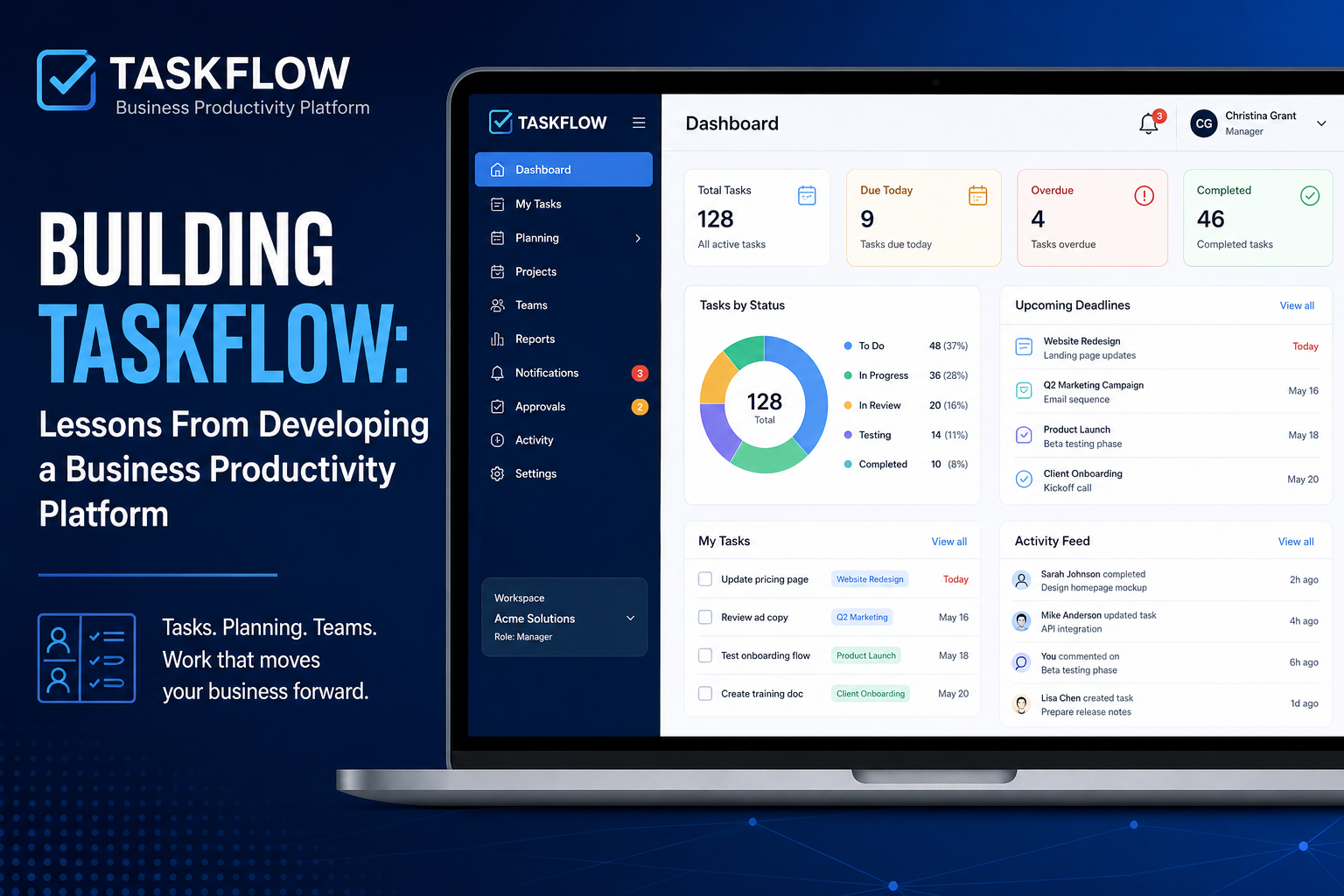
Taskflow began as a practical productivity tool and evolved into a broader business platform with task management, daily and weekly planning, recurring work, role-based permissions, team collaboration, notifications, approvals, reports, and database-backed user accounts.
The most valuable lessons did not come from adding more features. They came from deciding how those features should work together.
This article shares the lessons I learned while developing Taskflow through Computer Technologies, LLC, including the technical and product decisions that changed the platform as it grew.
What Is Taskflow?
Taskflow is a business productivity platform designed to help individuals and teams organize work, understand priorities, manage recurring responsibilities, and maintain visibility into what is happening across a workspace.
The platform combines several types of productivity activity that are often separated across different tools:
- Task management
- Daily planning
- Weekly planning
- Recurring tasks
- Time blocks
- Projects
- Team collaboration
- Notifications
- Comments
- Checklists
- Testing and approval workflows
- Activity history
- Reporting
- Role-based access
One of the goals behind Taskflow is to reduce the number of places users need to look to understand their work.
Instead of asking users to remember what needs attention, the system is designed to help surface that information.
Lesson 1: A Productivity Platform Needs a Workflow, Not Just Features
One of the earliest lessons from Taskflow was that individual features are not enough.
A task can have a title, due date, status, priority, checklist, comments, and assigned user. But the important question is what happens to that task over time.
- Where does the task appear when it is created?
- What happens when its due date approaches?
- What happens when someone changes its status?
- What happens when another person needs to review it?
- What happens when it is part of a recurring responsibility?
- What does a manager need to see that a regular user does not?
Thinking about these questions changed the way I approached development. Instead of designing Taskflow around isolated features, I began designing around the lifecycle of work.
Development lesson: Design the workflow before expanding the feature list.
Lesson 2: Daily Planning and Task Management Are Related, but They Are Not the Same
Task management answers a question such as: What work needs to be completed?
Daily planning answers a different question: What am I actually going to work on today?
That distinction became important in Taskflow.
A user may have dozens of open tasks, but showing all of them in one undifferentiated list does not necessarily help that person decide what to do next.
Taskflow therefore developed daily and weekly planning capabilities alongside the broader task system.
- Everything that exists
- What is important this week
- What needs attention today
- What has already been completed
The development lesson was that productivity software should not assume that storing tasks and planning work are the same activity.
Lesson 3: Time Blocks Need to Persist Independently of Tasks
Another design decision involved time blocks.
A time block is not necessarily a task.
Someone may reserve time every morning for email, administrative work, client follow-up, planning, or another repeated activity even when no individual task record exists for that period.
Taskflow’s planning structure therefore needed to account for persistent time blocks rather than treating every block of time as a one-time task.
Development lesson: Do not force different kinds of user activity into the same data model simply because they look similar in the interface.
Lesson 4: Recurring Tasks Are More Complicated Than Repeating a Date
Recurring tasks were another area where a seemingly simple feature became a workflow problem.
At first glance, recurrence sounds straightforward: create the same task every week or every month.
But a useful recurring-task system needs to answer several questions.
- Should every future occurrence be created at once?
- Should the system create only the next occurrence?
- What happens if the current task is completed early?
- What happens when one occurrence is edited?
- Should recurrence continue after an individual task changes?
For Taskflow, automatically creating the next recurring occurrence became an important part of the workflow.
That approach avoids filling the database and interface with large numbers of future tasks while still ensuring repeated responsibilities are not forgotten.
Lesson 5: Roles Should Control Capabilities, Not Just Labels
As Taskflow expanded beyond individual use, permissions became increasingly important.
It was not enough to identify someone as a manager, member, or viewer. Those roles needed to determine what each person could actually do.
A viewer may need access to information without permission to alter it. A team member may need to update tasks within the scope of their work. A manager may need broader editing, reporting, and oversight capabilities.
Permissions should be enforced by the application and data layer, not merely represented visually in the interface.
Hiding an edit button is not the same as preventing an unauthorized edit.
Lesson 6: Moving From Browser Storage to a Real Backend Changes the Application
One of the most significant stages in Taskflow’s development was moving from an earlier browser-based implementation toward a backend architecture using Supabase.
A browser-based prototype is useful because it allows ideas and workflows to be tested quickly.
But local browser persistence has limitations for a multi-user business platform.
- Secure authentication
- Multiple user accounts
- Shared workspaces
- Team access
- Centralized data
- Permissions
- Reporting across users
- Synchronization between devices
Moving Taskflow to Supabase introduced a more appropriate architecture for those requirements.
The platform could then use authenticated users and PostgreSQL-backed application data rather than relying on information stored only inside the user’s browser.
Lesson 7: Row Level Security Is Important in Multi-Workspace Applications
Once users and workspaces entered the application, data separation became critical.
A business platform cannot rely solely on the interface to determine what information someone can access.
Taskflow’s Supabase architecture uses Row Level Security to help control access to database records.
Architecture question: How do we make sure someone in Workspace A cannot access data belonging to Workspace B?
Authorization needs to be considered at the database level as well as the application level.
Lesson 8: Authentication Is Only the Beginning of User Management
Adding login functionality does not complete a user-management system.
Taskflow also needed to consider how users enter a workspace and what happens after authentication.
That led to invitation-code onboarding as part of the platform structure.
The invitation process helps connect authenticated users with the appropriate workspace rather than treating every registered account as an unrestricted platform user.
Authentication answers, “Who is this person?” Authorization answers, “What is this person allowed to access?”
Lesson 9: Dashboards Should Be Built From Real Data
Dashboards are easy to design before the underlying application data exists.
The harder—and more valuable—part is making the dashboard accurately represent what is actually happening.
As Taskflow became database-backed, dashboard metrics could be tied to actual task and workspace information.
- Open work
- Completed work
- Overdue tasks
- Upcoming deadlines
- Work by status
- Activity across projects
- Workload trends
Lesson 10: Collaboration Requires Context Around the Task
Once multiple people are working in an application, the task itself is no longer enough. Users need context.
Taskflow therefore incorporated features such as comments, checklists, and activity history.
- What still needs to happen?
- What did another team member say about this?
- Who changed the status?
- What happened before I opened this task?
Lesson 11: Activity History Is Valuable for Users and Troubleshooting
Activity history initially appears to be a collaboration feature. It also becomes valuable for troubleshooting.
When an application displays only the current state of a record, it can be difficult to determine how that record reached that state.
For Taskflow, tracking meaningful changes helps users and managers understand what occurred without relying completely on memory.
Lesson 12: Approval Workflows Change What “Complete” Means
One of the more interesting workflow problems in Taskflow involved testing and approval.
Work may be finished by one person but still require testing or approval by someone else.
“I finished my part” is not always the same as “this work is complete.”
Lesson 13: Notifications Should Support the Workflow
Taskflow includes in-app notifications with read and unread states.
The purpose of the notification system is not simply to create more alerts. It is to surface events that require attention.
More notifications do not automatically create better communication. Notifications work best when connected to meaningful workflow events.
Lesson 14: Managers and Individual Users Need Different Views
An individual user needs to understand their own work. A manager may need to understand work across multiple people or projects.
Taskflow therefore developed both personal planning functionality and team reporting capabilities.
- What is falling behind?
- What work has been completed?
- Where are there bottlenecks?
- Which projects require attention?
- What is happening across the team?
Lesson 15: Reporting Requirements Should Influence Database Design
Taskflow reinforced the value of considering analytics while designing operational data.
- Timestamps
- Status changes
- Assignments
- Completion information
- Workspace relationships
- Project relationships
- Historical activity
Lesson 16: Separate Workspace Structure From Project Structure
A workspace and a project serve different purposes.
A workspace defines a broader organizational environment. Projects organize work within that environment.
Keeping those concepts separate makes the application easier to expand and creates a clearer foundation for permissions, reports, and team membership.
Lesson 17: The Interface Has to Hide the Complexity Behind the Platform
Taskflow became more technically sophisticated as development progressed.
That does not mean the interface should become more complicated.
A simple interface often requires complex engineering behind it. The goal is not to expose that complexity. The goal is to manage it.
Lesson 18: Building the Real Application Changes Your Original Assumptions
Taskflow did not evolve in a perfectly straight line.
The development process exposed assumptions that needed to change. Some concepts that worked in a browser-based version needed to be redesigned after authentication and shared workspaces were introduced.
Prototype question:
Can this idea work?
Platform question:
How should this work when people actually depend on it?
From Prototype to Platform
Authentication
Individual user accounts replace browser-local identity.
Database-Backed Storage
Application data persists centrally through PostgreSQL.
Workspaces
Users operate inside defined organizational environments.
Projects
Tasks can be grouped into meaningful bodies of work.
Roles and Permissions
Different users can have different platform capabilities.
Row Level Security
Database access can be restricted by workspace relationships.
Recurring Work
Repeated responsibilities continue without manual recreation.
Planning
Daily and weekly views translate tasks into actionable work.
Collaboration
Comments, checklists, notifications, and history add context.
Approvals
Work can move through review and testing before completion.
Reporting
Managers can gain a broader view of work across the team.
What Building Taskflow Taught Me About Business Software
The largest lesson from developing Taskflow is that business software is fundamentally about relationships between processes.
- Who owns the work
- When it needs to happen
- What happens next
- Who needs visibility
- Who can make changes
- Whether approval is required
- What should repeat
- What information needs to be preserved
Good software has to represent the way work actually happens.
Key Takeaways From Developing Taskflow
- Design the workflow before expanding the feature list.
- Treat planning and task storage as related but distinct problems.
- Model recurring work intentionally.
- Build permissions into the architecture.
- Enforce important access controls at the data layer.
- Separate authentication from authorization.
- Design dashboards around decisions.
- Preserve useful activity history.
- Represent approvals and reviews when the workflow requires them.
- Keep notifications tied to meaningful events.
- Design reporting requirements early.
- Keep workspaces, projects, and tasks conceptually separate.
- Allow the backend to handle complexity so the interface stays understandable.
- Expect the application to evolve as real workflows expose new requirements.
What Comes Next for Taskflow
The next stages of Taskflow development will continue to focus on making the platform more useful without making it unnecessarily complicated.
I also plan to document more of the development process through Computer Technologies Insights.
Future articles will examine individual parts of the platform in greater technical detail, including database architecture, role-based permissions, recurring task logic, productivity dashboard design, and lessons from using Supabase in a multi-user business application.
About Taskflow
Taskflow is a business productivity platform currently being developed by Computer Technologies, LLC. The platform brings task management, planning, recurring workflows, collaboration, permissions, reporting, and team visibility into a unified business application.
About the Author
Christina Grant is a web developer and programmer with Computer Technologies, LLC. Her work includes web development, application development, SEO, analytics integration, automation, and practical technology solutions for businesses.
Built With
Taskflow is being developed using a modern web application stack designed to support authentication, structured data, workspace security, and continued platform growth. The links below point to the official documentation for the primary technologies used in the platform.
- Node.js
- Supabase
- PostgreSQL
- Row Level Security
- HTML
- CSS
- JavaScript
Continue Reading
Explore more practical technology, development, SEO, and business application insights from Computer Technologies.