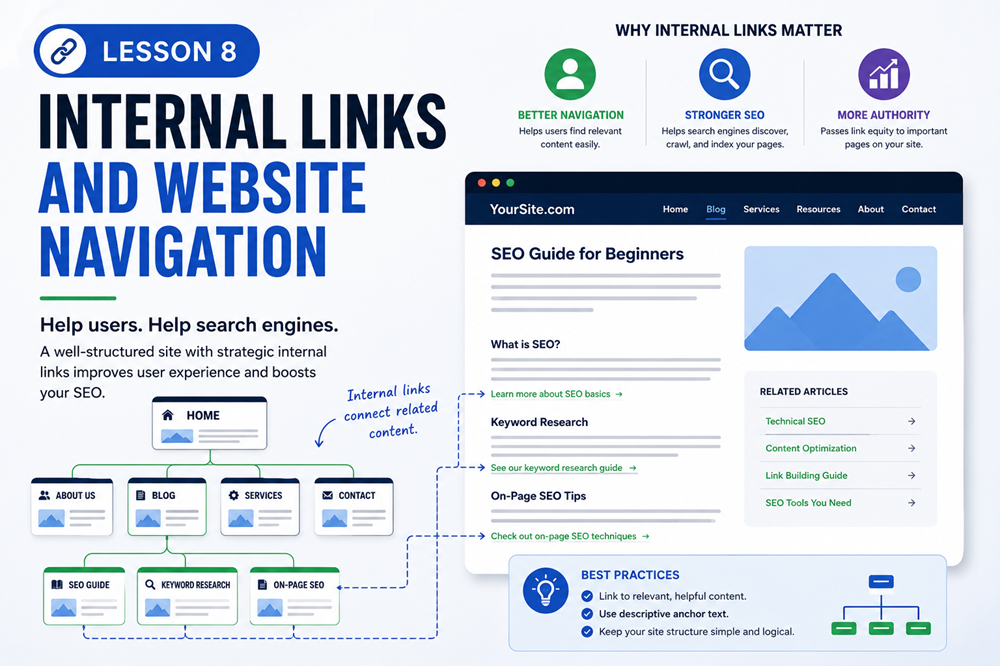
Lesson Overview
Internal links and website navigation help visitors move through your website. They also help search engines discover pages and understand how your content is connected.
A website should not feel confusing or hard to use. Good navigation and helpful internal links make it easier for people to find information, explore related pages, and take the next step.
What You Will Learn
In this lesson, you will learn what internal links are, why navigation matters, how internal links support SEO, and how to create a better website structure for users and search engines.
What Are Internal Links?
An internal link is a link from one page on your website to another page on the same website.
For example, if your homepage links to your services page, that is an internal link. If a blog post links to a related lesson, service, or contact page on the same website, that is also an internal link.
Example
A page about computer repair services might link to related pages such as laptop repair, virus removal, data backup, and contact us.
Why Internal Links Matter
Internal links are important because they help users and search engines move through your website.
Internal links can help:
- Guide visitors to related content
- Help search engines discover pages
- Show how pages are connected
- Keep visitors on your website longer
- Point users toward important pages
- Improve the overall structure of your site
How Internal Links Help SEO
Search engines use links to discover and understand pages. When a page has useful internal links, it becomes easier for search engines to find related content on your website.
Internal links also help search engines understand which pages are important. If many pages link to a certain service page, that can signal that the page is important within your website.
What Is Website Navigation?
Website navigation is the menu and link structure visitors use to move around your site. This often includes your main menu, footer links, sidebar links, buttons, and page links.
Good navigation helps users understand where they are, what pages are available, and where to go next.
Main Navigation Menu
The main navigation menu usually appears at the top of a website. It should include the most important pages visitors need.
Common main menu links include:
- Home
- About
- Services
- Courses
- Blog
- Contact
The main menu should be simple and easy to understand. Too many menu items can make the website feel overwhelming.
Footer Navigation
The footer appears at the bottom of a website. It is a good place to include helpful links that may not need to be in the main menu.
Footer links may include:
- Privacy Policy
- Terms of Service
- Contact Information
- Service Areas
- Important Resources
- Social Media Links
Anchor Text
Anchor text is the clickable text inside a link. Good anchor text should clearly describe where the link will take the visitor.
Example of Anchor Text
Weak anchor text:
- Click here
- Read more
- Learn this
Better anchor text:
- Learn more about computer repair services
- View our website maintenance plans
- Read the beginner SEO guide
Link to Related Content
Internal links should be useful and relevant. Do not add links just to add links. Each link should help the visitor find more helpful information.
For example, a lesson about keywords could link to lessons about page titles, meta descriptions, or content structure.
Make Important Pages Easy to Find
Important pages should not be buried too deep inside your website. If a page matters to your business, your visitors should be able to find it easily.
Important pages may include:
- Main service pages
- Contact page
- Course landing pages
- Pricing or plan pages
- Location pages
- Helpful resource pages
Avoid Broken Links
A broken link is a link that leads to a missing page or error page. Broken links create a poor user experience and can make a website look neglected.
Common causes of broken links include:
- Deleting a page without updating links
- Changing a page URL
- Typing a URL incorrectly
- Linking to an old page that no longer exists
Simple Internal Linking Strategy
A simple internal linking strategy can help keep your website organized.
Use this basic approach:
- Link from broad pages to specific pages
- Link from related lessons or articles to each other
- Link important pages from your main navigation when appropriate
- Use clear anchor text
- Check links regularly to make sure they still work
Simple Rule
Every important page should be reachable through clear navigation or helpful internal links. Visitors should not have to guess where to go next.
Common Internal Linking Mistakes
When adding internal links and navigation, avoid these common mistakes:
- Using vague link text like “click here” too often
- Adding too many links in one paragraph
- Linking to unrelated pages
- Leaving important pages hard to find
- Having broken links
- Making menus too crowded or confusing
- Using buttons that do not clearly explain the next step
Example Website Structure
A small business website might use this structure:
- Home
- Services
- Computer Repair
- Website Maintenance
- SEO Services
- Courses
- SEO Basics
- WordPress Basics
- About
- Contact
This kind of structure makes it easier for visitors and search engines to understand the major areas of the website.
Key Takeaway
Internal links and website navigation help users find information and help search engines understand your site structure. Use clear menus, helpful links, descriptive anchor text, and a simple structure that makes important pages easy to find.
Lesson Quiz
Complete this short quiz to test your understanding of internal links and website navigation.