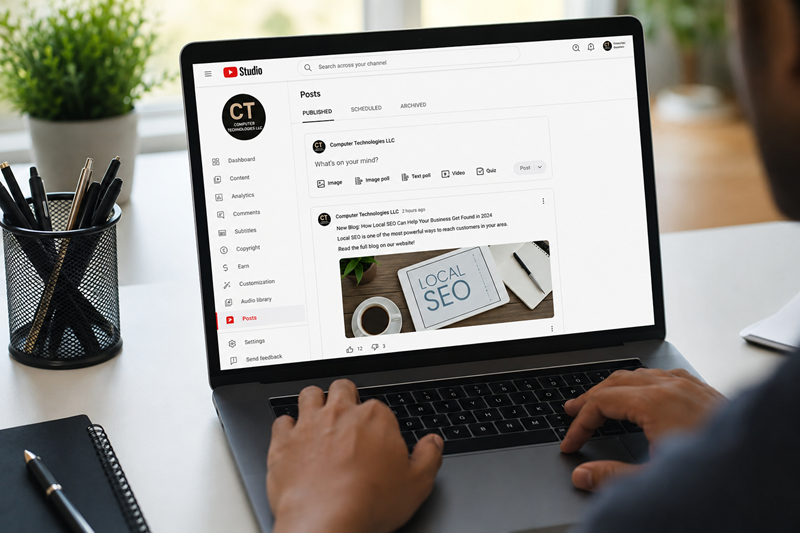
YouTube Posts
YouTube is no longer only a place to upload videos and wait for people to discover them. The platform has grown into a powerful content and engagement tool where creators, businesses, nonprofits, educators, and brands can communicate with their audience in more ways than video alone. One of the most useful updates for channel owners is the feature now called YouTube Posts.
The feature many creators previously knew as Community posts or the Community tab is now presented as Posts. This change makes the feature easier to understand because it works much like posting on a social media account. Instead of only uploading long-form videos, Shorts, or livestreams, a channel can now share quick updates, images, polls, quizzes, videos, and announcements directly with its audience.
According to YouTube Help, Posts can include text, images, polls, quizzes, GIFs, music, and videos. This makes the feature one of the easiest ways for channel owners to stay active without creating a full video every time they want to communicate with their audience.
For businesses, this is a major opportunity. YouTube Posts gives your channel a social media-style communication tool inside YouTube. It helps you stay active between video uploads, promote new content, ask your audience questions, share business updates, and build a stronger connection with subscribers.
At Computer Technologies LLC, we help businesses improve their online presence through web development, SEO, AI solutions, automation, analytics, digital marketing, and content strategy. YouTube Posts fits directly into a modern digital marketing strategy because it supports audience engagement, content repurposing, search visibility, and brand consistency across platforms.
What Are YouTube Posts?
YouTube Posts are short updates that creators can publish directly on their YouTube channel using text, images, polls, quizzes, GIFs, music, or videos. They help channels communicate with viewers between video uploads, increase engagement, and keep subscribers connected.
Think of YouTube Posts as YouTube’s built-in social media posting feature. Instead of creating a full video every time you want to communicate with your audience, you can use Posts to share a quick update, ask a question, promote a new video, post an image, create a poll, or run a quiz.
This gives creators and business owners a faster way to stay active on YouTube. For example, a business can use YouTube Posts to announce a new service, share a project update, promote a blog article, ask followers what topic they want covered next, or remind viewers about an upcoming event.
A nonprofit can use YouTube Posts to share program updates, volunteer opportunities, student success stories, fundraising reminders, educational questions, or community announcements.
This feature is valuable because consistency matters online. Many YouTube channels go quiet between video uploads because creating videos takes time. Posts solves that problem by giving channels a lightweight way to stay visible and active.
Why YouTube Posts Matter for Channel Growth
YouTube is a search engine, a video platform, and now more clearly a social engagement platform. When viewers interact with your content through likes, comments, votes, and replies, that activity helps strengthen the relationship between your channel and your audience.
The biggest benefit of YouTube Posts is that they help your channel stay active between uploads. If you only publish videos once or twice a month, your subscribers may not hear from you often. With Posts, you can communicate several times a week without needing to produce a full video every time.
YouTube Posts can help with:
- Audience engagement
- Channel visibility
- Brand awareness
- Video promotion
- Content testing
- Community building
- Subscriber retention
- YouTube SEO support
- Lead generation
- Website traffic
For small businesses, this is especially useful. A business may not always have time to film and edit weekly videos, but it can still post helpful tips, service reminders, customer questions, polls, images, and educational updates.
If your business needs help building a stronger online presence, contact Computer Technologies LLC for help with website strategy, SEO, automation, and digital visibility.
How YouTube Posts Support SEO and Discoverability
When people think about YouTube SEO, they usually focus on video titles, descriptions, tags, thumbnails, captions, and watch time. Those are still important. However, YouTube Posts adds another layer to your content strategy.
Posts can support YouTube SEO by keeping your audience engaged with your channel and reinforcing important keywords around your niche. If your channel is about web design, SEO, AI tools, digital marketing, education, real estate, fitness, nonprofit services, or local business services, your Posts can repeatedly use the phrases your audience is already searching for.
For example, a web development and SEO company could publish Posts using keywords such as:
- Website design tips
- SEO for small businesses
- Google Business Profile optimization
- AI chatbot setup
- Local SEO strategy
- Website performance
- Mobile-friendly web design
- Business automation
- Digital marketing services
- YouTube marketing
This does not replace proper video SEO, but it supports your overall channel topic authority. When your channel consistently publishes content around a clear subject, viewers understand what your brand offers, and YouTube receives more engagement signals connected to your niche.
For Computer Technologies LLC, this type of strategy connects directly with services such as SEO strategy for small businesses, schema markup, analytics, automation, web development, local SEO, and social media implementation. Your YouTube channel should not sit separately from your website. It should support your website, your blog, your services, your Google Business Profile, and your overall search visibility.
How Businesses Can Use YouTube Posts Like a Social Media Account
The most useful part of YouTube Posts is that businesses can use the feature similarly to a social media feed. Instead of thinking of YouTube only as a video library, think of your channel as a digital communication hub.
You can use YouTube Posts to share updates, ask questions, promote services, post images, test content ideas, and invite your audience to interact with your brand.
1. Share Business Updates
YouTube Posts can be used to announce company news, new services, website updates, schedule changes, seasonal offers, or upcoming events.
Example:
We just launched a new SEO Audit and Report service for small businesses that want to improve their visibility on Google. If your website is not ranking, this is a great first step.
This type of post keeps your audience informed and gives them a reason to engage with your business beyond video content.
2. Promote New Videos
Every time you publish a new video, create a YouTube Post to promote it. This gives your upload another chance to be seen by subscribers and returning viewers.
Example:
New video is live: How to Improve Your Website SEO. Watch now and learn the top mistakes small businesses make with page titles, keywords, mobile performance, and page structure.
You can attach the video directly to the Post and include a short reason why viewers should watch it. You can also use YouTube Studio to manage videos, monitor analytics, and review how your content is performing.
3. Ask Poll Questions
Polls are one of the easiest ways to increase engagement because viewers can respond quickly. A poll does not require them to write a comment, but it still encourages interaction.
Example poll:
What do you need the most help with right now?
- Website design
- SEO
- AI automation
- Google Business Profile
- Social media content
This helps you understand your audience while also creating engagement on your channel.
4. Use Quizzes for Education
Quizzes are useful for educational channels, training programs, nonprofits, and service businesses that want to teach their audience.
Example quiz:
Which one helps your website rank better on Google?
- A fast-loading website
- Hidden text
- Broken links
- Duplicate pages
This format works well for businesses that teach clients about SEO, digital marketing, website design, online visibility, and business automation.
5. Share Images and Graphics
Image Posts can help your channel stand out visually. Businesses can share graphics, flyers, infographics, before-and-after screenshots, event images, service highlights, and branded announcements.
A web design or digital marketing business could post:
- A screenshot of a redesigned website
- An SEO checklist graphic
- A flyer for a free consultation
- A comparison of poor versus optimized page structure
- A local SEO map pack example
- A website speed report image
Visual posts are useful because they can grab attention quickly in a feed.
6. Drive Traffic to Your Website
YouTube Posts can support your website content strategy. When you publish a blog on your website, you can create a Post summarizing it and encouraging viewers to visit the full article.
Example:
New blog: Why Local SEO Matters for Small Businesses. Learn how Google Business Profile optimization, keywords, reviews, and schema markup can help your business appear in local search results.
This turns your YouTube channel into a traffic source for your website. You can also connect viewers to helpful resources, such as your business blog, service pages, and contact page.
7. Promote Services Without Being Too Sales-Heavy
YouTube Posts should not feel like constant ads. The best strategy is to mix helpful content with promotional content.
A good weekly balance could look like this:
- Monday: Educational tip
- Wednesday: Poll or quiz
- Friday: Service reminder
- Weekend: Video promotion or behind-the-scenes update
Example:
Quick SEO Tip: Your page title should clearly describe the service and location you want to rank for. Instead of using a basic title like “Home,” use a title that describes your business, service, and location.
This type of post provides value while naturally supporting your services.
How Can YouTube Posts Help a Channel Grow?
YouTube Posts can help a channel grow by increasing engagement, keeping subscribers active between uploads, promoting new videos, collecting viewer feedback, and creating more opportunities for comments, likes, votes, and shares. Businesses can use Posts as a social media-style tool inside YouTube.
This type of direct answer is useful for SEO because it clearly answers a common search question in a short, snippet-friendly format.
Why YouTube Posts Are Useful for Small Businesses
Small businesses often struggle with content consistency. They know they need to stay active online, but creating content across every platform can become overwhelming. YouTube Posts makes this easier because one short update can support multiple goals.
A single YouTube Post can:
- Promote a service
- Start a conversation
- Support a video
- Send people to a blog
- Collect audience feedback
- Increase brand visibility
- Keep subscribers engaged
- Reinforce SEO keywords
- Repurpose social media content
For example, a business that already posts on Facebook, LinkedIn, or Instagram can repurpose that same message into a YouTube Post. A blog excerpt can become a Post. A customer FAQ can become a quiz. A service announcement can become an image update. A YouTube video can become a poll question.
This makes YouTube Posts a smart tool for businesses that want more visibility without adding another complicated marketing task.
Best Practices for YouTube Posts
Post Consistently
A good starting schedule is two to four Posts per week. You do not need to post every day, but you should be consistent enough that your channel looks active.
Use Clear Keywords
Use natural keywords in your Posts. For example, if your business offers SEO services, include terms like SEO tips, Google ranking, local SEO, website optimization, online visibility, and digital marketing.
Do not keyword-stuff. Make sure your language sounds natural and matches what your audience searches for.
Include Calls to Action
Tell viewers what to do next. Ask them to vote, comment, watch a video, read a blog, schedule a consultation, or visit your website.
Examples include:
- Vote below.
- Comment with your biggest question.
- Watch the full video.
- Read the full blog on our website.
- Schedule a consultation.
Mix Content Types
Do not only post text updates. Use a mix of text posts, image posts, polls, quizzes, video shares, behind-the-scenes updates, educational tips, and service reminders.
This keeps your channel interesting and gives you more ways to learn what your audience responds to.
Keep Posts Short and Clear
Most YouTube Posts should be easy to read quickly. Use a strong first sentence and avoid long paragraphs. If you want to share more detail, send viewers to a full blog post or video.
Repurpose Existing Content
You do not need to create everything from scratch. Turn your blog posts, videos, FAQs, service pages, and social media updates into YouTube Posts.
For example, Computer Technologies LLC could repurpose service content into Posts such as:
- Is your website mobile-friendly?
- Do you know if your Google Business Profile is optimized?
- Could an AI chatbot help your business answer customer questions faster?
- Does your website have schema markup?
- When was the last time you checked your website speed?
Each of these can become a text post, poll, quiz, or image graphic.
YouTube Posts Content Ideas for Business Channels
Educational Tip Post
Quick website tip: If your homepage does not clearly explain what you do within the first few seconds, visitors may leave before taking action. Strong headlines, fast loading speed, and clear calls to action can improve conversions.
Poll Post
What area of your online presence needs the most improvement?
- Website design
- SEO
- Google Business Profile
- Social media
- AI automation
Quiz Post
Which one is an example of local SEO?
- Adding your city to service pages
- Deleting all images
- Removing contact information
- Using vague page titles
Promotional Post
Need help improving your website visibility? Computer Technologies LLC offers web development, SEO strategy, AI chatbot setup, automation solutions, and digital marketing support for small businesses.
Video Promotion Post
New video coming soon: How YouTube Posts can help small businesses stay visible without creating a full video every day.
Behind-the-Scenes Post
We are working on new SEO training content for small business owners. What would you like us to explain next: keywords, Google Business Profile, backlinks, website speed, or AI automation?
Why YouTube Posts Should Be Part of Your Digital Marketing Strategy
YouTube Posts is not just a small feature. It is a practical marketing tool that helps businesses stay connected with their audience. When used correctly, it can support SEO, social media marketing, video promotion, content strategy, and customer engagement.
For businesses already investing in a website, blog, Google Business Profile, and social media, YouTube Posts creates another touchpoint. It allows your brand to show up more often, answer questions, promote useful content, and guide people toward your services.
The best digital marketing strategies are connected. Your website should support your YouTube channel. Your YouTube channel should support your blog. Your blog should support your Google rankings. Your Google Business Profile should support your local visibility. Your social media should support your brand awareness.
YouTube Posts can help connect all of these pieces.
Final Thoughts
YouTube Posts gives creators and businesses a powerful way to communicate beyond video uploads. It works like a built-in social media feed for your YouTube channel, allowing you to post updates, polls, quizzes, images, videos, and announcements directly to your audience.
For small businesses, this feature can help improve engagement, promote services, drive traffic to a website, support YouTube SEO, and keep a channel active between video uploads. It is especially valuable for brands that want to stay visible but do not always have time to produce full videos.
If your business has a YouTube channel, the Posts tab should become part of your weekly marketing routine. Use it to educate, engage, promote, and listen to your audience.
Computer Technologies LLC helps businesses build stronger digital systems through web development, SEO, AI tools, automation, analytics, and content strategy. If your website, YouTube channel, or online presence needs improvement, now is the time to create a smarter strategy that connects your content, search visibility, and customer engagement.
Frequently Asked Questions About YouTube Posts
What are YouTube Posts?
YouTube Posts are short updates that creators can publish on their channel using text, images, polls, quizzes, GIFs, music, or videos. They help creators interact with viewers between regular video uploads.
Are YouTube Posts the same as the Community tab?
Yes. YouTube Posts are the updated name for what many users previously called Community posts or the Community tab. The feature still allows creators to share updates and interact with viewers.
Can businesses use YouTube Posts?
Yes. Businesses can use YouTube Posts to share updates, promote videos, ask poll questions, post images, run quizzes, announce services, and drive traffic to their website.
Do YouTube Posts help with engagement?
Yes. YouTube Posts can encourage likes, comments, votes, and replies. They help channels stay active and keep viewers connected between video uploads.
What should I post on YouTube Posts?
Businesses can post educational tips, service updates, polls, quizzes, behind-the-scenes images, blog links, video announcements, customer questions, and promotional updates.
Ready to Strengthen Your YouTube and Digital Marketing Strategy?
YouTube Posts is a simple but powerful feature that gives businesses another way to stay visible, engage their audience, and promote their content without creating a full video every time. When used consistently, Posts can help support YouTube channel growth, increase audience interaction, drive traffic to your website, and connect your video strategy with your overall digital marketing plan.
For small businesses, the key is not just being online. The key is using each platform with purpose. Your website, blog, YouTube channel, Google Business Profile, SEO strategy, and social media content should all work together to help people find your business, understand what you offer, and take the next step.
Computer Technologies LLC helps businesses build stronger online systems through website development, SEO strategy, AI automation, analytics, digital marketing, and content optimization. Whether you need help improving your website visibility, creating a better content strategy, or connecting your YouTube channel to your business goals, we can help you create a digital presence that works together.